Setup Assistant
The Setup Assistant is a guided first-run, migration, and advanced-configuration planner. It previews intended changes and applies them only after review.
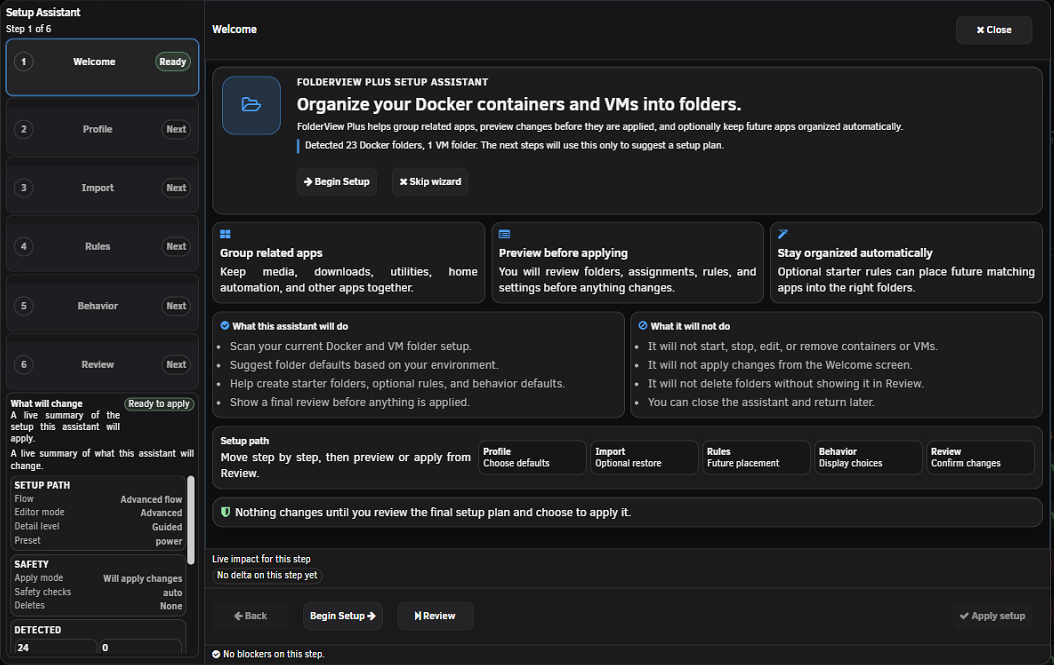
The assistant detects existing folders, rules, and backups to suggest a route:
- New: clean first-time setup.
- Migrate: bring in existing FolderView data or exports.
- Advanced: tune an established environment.
Guided mode keeps safer defaults and fewer decisions. Expert exposes import behavior, thresholds, and other fine-grained controls. You can review the plan regardless of detail mode.
Quick presets include Balanced, Minimal, Power, and Media Stack. Detection may suggest Power for a large environment or Media Stack for a Docker-heavy layout. Presets are starting points; review their impact instead of assuming the name fits your server.
You can save, load, and delete local Setup Assistant presets. Saved presets live in browser storage, so they are browser/profile-specific and should not replace a configuration export.
Quick presets are wizard plans, not saved folder templates. Starter folder templates are proposed folders/rules that become normal server configuration only after Apply. Rule templates create individual ordered matchers, while saved folder templates in Advanced Operations hold reusable folder settings. See Automation, Rules, and Templates.
Smart detection uses current inventory and configuration scale to suggest a starting preset or starter layout. A suggestion does not apply anything and may not understand application-level relationships; the Review plan remains authoritative.
Fresh setup does not require an import. Migration routes can include Docker and VM files independently. The assistant validates type and schema before allowing inclusion. Guided mode uses Merge for safer imports; Expert mode exposes additional behavior.
For a complete installed FolderView3 conversion, use the dedicated FolderView3 Migration preview so defaults, rules, start order, and appearance are reviewed together.
- Auto: normal safeguards based on planned operations.
- Strict: blocks apply when warnings remain, when no changes exist, or when post-apply verification is incomplete.
- Fast: skips the global rollback checkpoint; use only when you already have a verified external recovery point.
The Review step summarizes route, mode, preset, imports, rules, defaults, warnings, and planned change counts. Use Copy Summary to retain a text record without exposing raw configuration.
-
Alt+Left/Alt+Right: previous/next step. -
Ctrl+Enter: apply from Review when allowed. -
Ctrl+Shift+C: copy the plan summary.
The assistant supports keyboard focus, reduced motion, compact/mobile layouts, live status messaging, and collapsible chips on small screens.
- Review the verification results and any failed items.
- Retry failed import/rule operations only after reading their error.
- Open Docker, VMs, and Dashboard.
- Run Diagnostics.
- Create a manual recovery snapshot after confirming the result.
Screenshot placeholder — Setup Assistant Review step
Capture a dry-run plan showing impact totals, warnings, and safety mode with fictional folder names. Do not include import filenames containing personal data.
Use standalone import/restore tools when you need to compare specific snapshots, replace exactly, restore a known backup, or troubleshoot one operation independently. The assistant is for coordinated setup plans, not a substitute for Recovery.