Folder Editor
The modern editor creates and updates Docker and VM folders. Its live preview is a design aid; save and verify the actual Docker, VM, and Dashboard surfaces before considering a change complete.
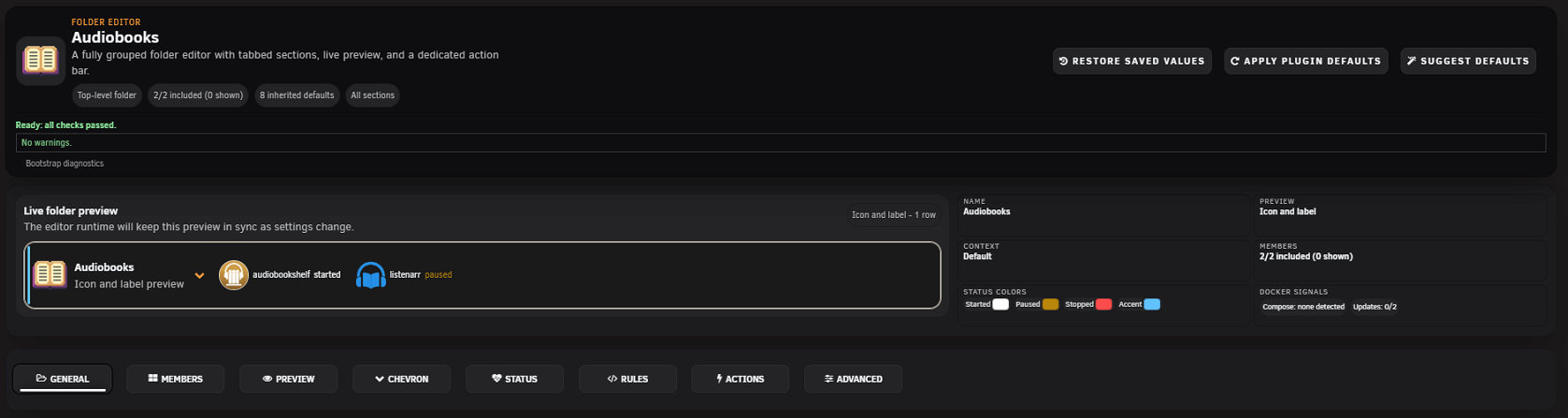
- Restore Saved Values discards unsaved edits and reloads the saved folder.
- Apply Plugin Defaults applies the current baseline/default profile to supported editor fields.
- Suggest Defaults derives a conservative starting point from the folder type and current content.
- Fields that say “Use global” or remain blank inherit the relevant global setting.
- Docker and VM can have different available controls; Docker-only fields are hidden for VM folders.
Saving uses the current configuration revision. If another browser or operation changed the folder, reload the conflict instead of repeatedly submitting stale values.
| Control | Behavior |
|---|---|
| Name | Must be valid and unique among siblings. Control characters are rejected. |
| Parent folder | Moves this folder and its descendants without flattening the branch. Maximum hierarchy depth is six. |
| Icon | Uses built-in, third-party, uploaded, URL/data-image, member, or fallback icons. |
| Folder WebUI | Adds a folder-level WebUI action. |
| WebUI URL | Optional explicit URL; blank inherits the normal folder WebUI behavior. |
Members are direct containers or VMs. Child folders are separate hierarchy nodes. Search, select, and manually order eligible members in this tab. A member normally has one effective folder after manual membership, labels, and ordered rules are evaluated.
Preview selections do not change membership. If a member is unavailable, check inventory, rule conflicts, and whether another folder owns it.
| Control group | Choices and effect |
|---|---|
| Preview mode | None, Icon and label, Only icon, Only label, or List. |
| Visibility | Always visible or hover-only. |
| Docker update emphasis | Orange member text and/or separate folder-title highlighting when an update is available. |
| Text width | Optional CSS length; blank means automatic/unlimited width. |
| Rows | 1, 2, 3, 4, or Unlimited. |
| Overflow | Use row limit, expand the row to show all, or horizontal scroll. |
| Icon styling | Optional grayscale. |
| Hover animation | None, Lift, Bounce, Pop, Glow, Flip, or Wiggle. Reduced-motion preferences remain authoritative. |
| Docker preview status | Status symbol, grayscale stopped icons, or hidden status. |
| Child folders | Show child-folder chips and choose direct children, 2 levels, 3 levels, or all nested folders. |
| Quick actions | WebUI, logs, and Docker console where supported. |
| Dividers | Vertical bars with color and 1–4 px thickness. |
| Row separators | Optional horizontal separators with color. |
| Border | On/off, color, thickness, and glow. |
| Context | None, Default, or Advanced. Advanced supports click/hover trigger. |
| Advanced graph | None, Combined, Split, CPU only, or memory only, with time window in seconds. |
Preview WebUI and console are Docker-only where the host supports them. Logs remain subject to current runtime capability.
Screenshot placeholder — Preview tab
Capture preview mode, rows/overflow, child-folder depth, border/divider settings, and Advanced context using fictional members.
Choose Minimal, Boxed, Ghost, Pill, or Filled. Set normal and hover colors or reset them to the current defaults. Verify the result in light, dark, high-contrast, keyboard-focus, and touch layouts.
| Control | Behavior |
|---|---|
| Accent | Optional left-side accent bar and color across runtime, Dashboard, and editor preview. |
| Started/Paused/Stopped colors | Per-folder status palette. |
| Lock status colors | Keeps this folder's selected colors authoritative against theme/host styling. |
| Health warning/critical | Optional 0–100% stopped-member thresholds; blank inherits global/profile values. |
| Health profile | Inherit global, Strict, Balanced, or Lenient. |
| Updates policy | Inherit global, Maintenance, Warn, or Ignore. |
| All-stopped policy | Inherit global, Critical, or Warn. |
| Status warning | Optional per-folder stopped percentage for status-chip attention. |
Status and health controls summarize state; they do not start, stop, or update a workload.
Screenshot placeholder — Chevron and Status tabs
Capture one chevron style, accessible status colors, accent control, and inherited versus overridden thresholds.
The Rules tab manages folder-targeted auto-assignment rules and legacy-regex conversion. Rule templates can build common matchers without hand-writing regular expressions. Preview shows matched, newly assigned, already controlled, and manually assigned members; manual members are not silently replaced by a preview.
See Automation, Rules, and Templates for matcher types, priority, and the four separate reusable systems.
Folder-menu actions are ordered and type-aware.
Standard actions can Cycle between two states, Set a selected state, or Restart eligible targets. Select the member targets and optional Font Awesome icon. Current member state, folder lock, type, and host capability determine whether an action is enabled.
User Script actions run an installed task from the separate User Scripts plugin. Enter the task name exactly as it appears there—names are case-sensitive and spaces matter. Configure arguments, foreground/background selection, and icon.
Security: a User Script action executes automation already installed on the server. Expose only trusted tasks and arguments through a folder menu, and test the task directly in User Scripts before delegating it to a multi-user UI.
Unavailable member targets or missing User Scripts tasks are not guessed. Repair the reference or remove the action.
Screenshot placeholder — folder actions
Capture Standard and User Script action editors with fictional targets. Do not expose script bodies, paths, tokens, or production arguments.
| Control | Behavior |
|---|---|
| Hide update column | Removes the Docker update column within this folder presentation. |
| Override default actions | Replaces the normal folder menu actions with configured custom actions. |
| Hide default action button | Removes the normal start/stop/restart shortcut from the folder menu. |
| Expanded on Docker/VM tab | Initial expansion preference for the corresponding runtime page. |
| Expanded on Dashboard | Initial Dashboard expansion preference. |
| Dashboard overflow | Default, expand row, or scrollable panel for expanded members. |
Screenshot placeholder — Advanced tab
Capture action overrides, initial expansion, and Dashboard overflow with their warnings visible.
Legacy folder regex remains readable for compatibility. Conversion creates an Advanced Include/Name-regex rule, creates a backup, and preserves the priority of existing higher rules. Invalid patterns must be repaired before conversion.
- Blank editor: copy bootstrap diagnostics before refreshing.
- Missing members: verify type, inventory, effective assignment, and rule priority.
- Preview differs from runtime: save, close, and verify the actual page.
- Clipped controls: test 100% zoom and disable conflicting custom CSS.
- Save conflict: reload current state; do not resubmit stale data.
- Missing icon/action target: run Diagnostics and repair or reselect the reference.
See Troubleshooting for recovery steps.