A browser-based configurator for MusicMatrix, a custom macro pad built for MuseScore Studio 4. Drag MuseScore shortcuts onto a 4×8 grid, and export ready-to-flash Arduino firmware.
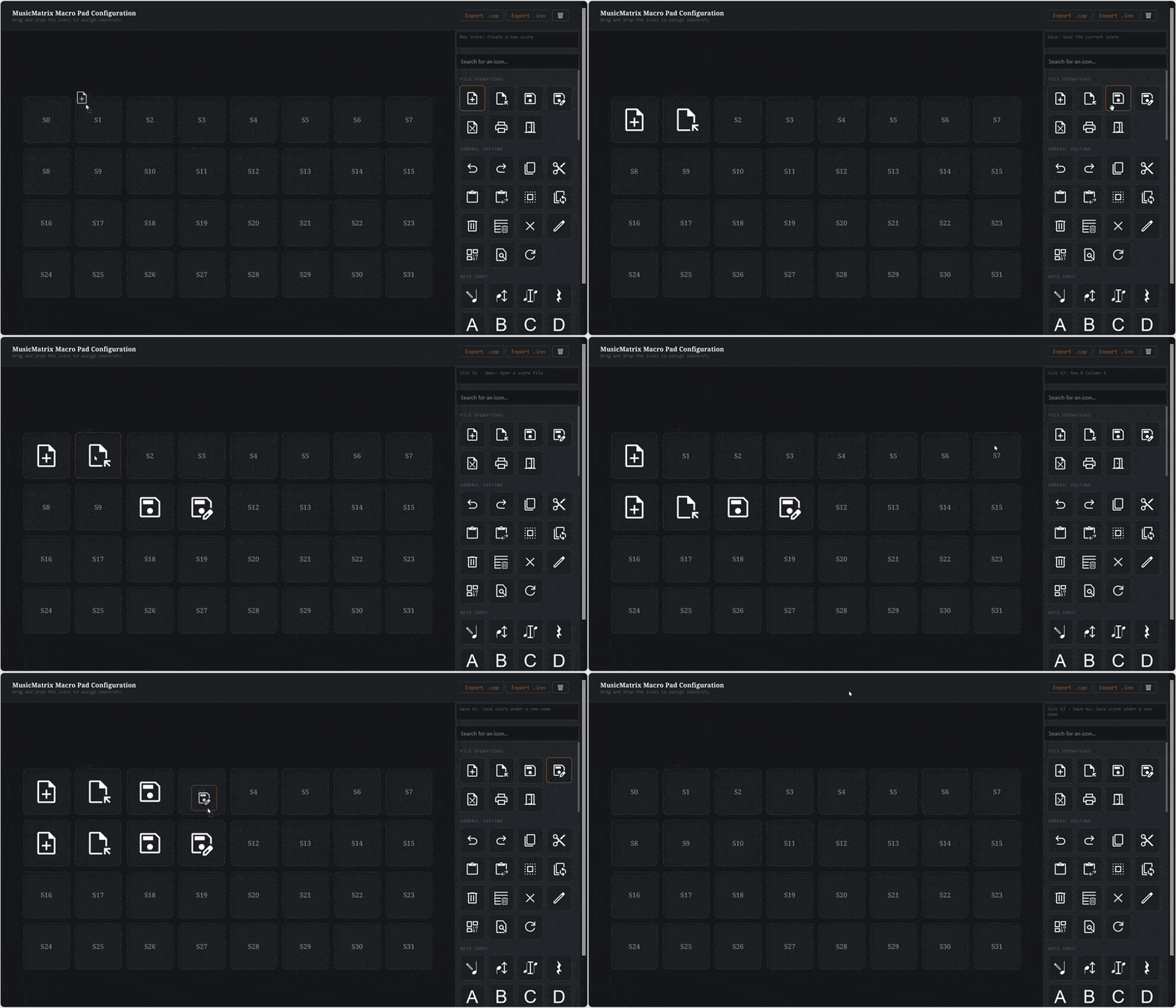


- Drag-and-drop assignment - drag any of MuseScore's keyboard shortcuts from the sidebar library onto one of the 32 macro slots.
- Searchable shortcut library - instantly filter by name or description (
Ctrl+Kor/to jump to search). - Hover-to-preview - hover or focus any icon to see its full name, description, and key combination before you commit it to a slot.
- Live status bar - no more guessing which slot is which; hovering a slot shows its row/column position or its currently assigned shortcut.
- One-click export - generates a full code file so you can drop it into your PlatformIO project or Arduino IDE sketch.
- Persistent layout - your grid is saved to the browser automatically (via
localStorage), so refreshing the page won't lose your work. - No build step, no backend - pure HTML/CSS/JS. Open
index.htmldirectly, or serve it with any static file server.
Navigate to https://treeguy1234.github.io/MusicMatrixWeb/ to get started. For a more customizable experience, host the files yourself.
- Browse or search the shortcut library on the right. Hover over any icon to see what it does.
- Drag a shortcut onto any of the 32 slots in the main grid.
- Rearrange by dragging an already-assigned slot's icon to a new slot, or click a filled slot to clear it.
- Once all 32 slots are assigned, the Export button unlocks — click it to download a
.ino/.cppfile containing your shortcut array, ready to paste into the MusicMatrix Arduino sketch.
.
├── index.html                # Page shell
├── style.css                 # All styling (design tokens, layout, chip/slot states)
├── main.js                   # Drag-and-drop logic, slot state, export
├── musescore_shortcuts.js    # Full shortcut data set (title, description, keys, icon path)
├── Fonts/                    # Contains a font file for the UI
└── Icons/                    # SVG icon set, extracted from the Bravura music font and Google Fonts/Icons
Shortcuts live in musescore_shortcuts.js as a single object, grouped by category:
const shortcuts = {
  "General Editing": [
    {
      title: "Undo",
      description: "Undo the last action",
      shortkey1: "Ctrl",
      shortkey2: "Z",
      shortkey3: "",
      icon: "./Icons/Undo.svg"
    },
    // ...
  ],
  // ...
};
To add, remove, or re-map a shortcut, edit this file directly. The sidebar will rebuild automatically from whatever's in here. Setting icon to null is fine; unmatched entries fall back to a text label.
This tool is built specifically for the MusicMatrix macro pad:
- 4×8 button grid (32 macros) + a 7-key piano section
- Arduino Leonardo or Arduino Uno R4 WiFi (native USB HID via
Keyboard.h) - Cherry MX–compatible switches, diode matrix wiring
Hardware design files and firmware live in a separate repo (I'm still making it)
- Piano section support in the configurator
- Touch-screen compatibility
- Import/export layout presets as shareable JSON
- Add your own shortcuts
Want to contribute an icon, shortcut, or anything else? Contributions are welcome!
- Fork this repository and clone it locally.
- Create a new branch for your change:
git checkout -b <your-branch-name>- Make your changes. Add an icon to
Icons/, update an entry inmusescore_shortcuts.js, whatever it may be. - Commit and push your branch:
   git commit -am "Description of your changes"
git push origin <your-branch-name>- Open a pull request describing what you added or changed.
If you're adding a new icon, please keep it visually consistent with the existing set (single-color, similar stroke weight) so everything reads well together on a small keycap.
If you spot a bug or have an idea but don't want to implement it yourself, feel free to just open an issue instead.
- Musical icons extracted from Bravura, the SMuFL-compliant music font by Steinberg, licensed under the SIL Open Font License.
- Shortcut reference from the official MuseScore Studio Handbook.
- Icons from Google Fonts
This project is licensed under the MIT License.