A pure-frontend web application built with Svelte 5 and Vite designed to clean up messy Markdown copied from Google Gemini, ChatGPT, Claude, and other AI chatbots so that it pastes and renders cleanly in Obsidian.
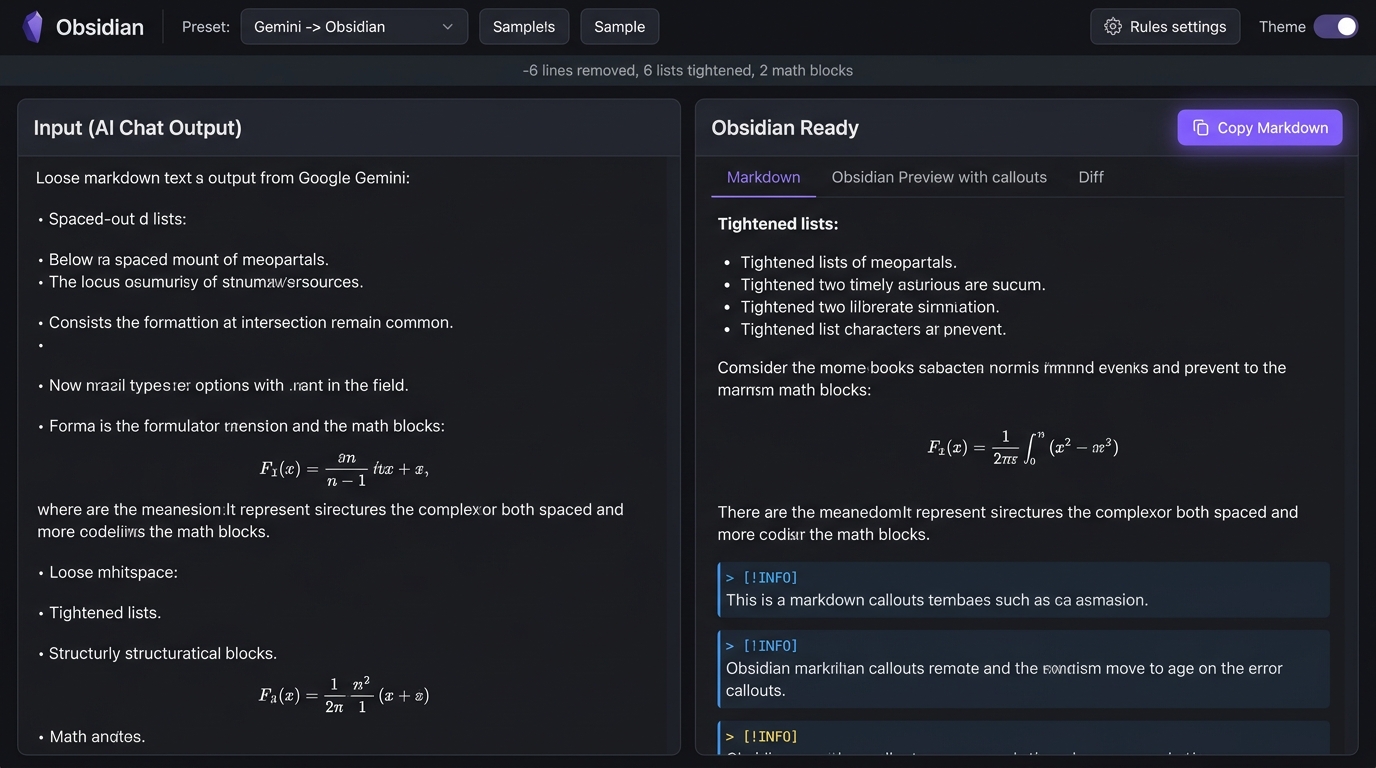
- Loose List Tightener (Gemini Fix): Automatically detects and eliminates extra empty lines between bullet points (
*,-,+), numbered lists (1.,a.), and task lists (- [ ]), keeping list items tight and clean in Obsidian. - LaTeX Math Normalizer: Converts LaTeX
\[ ... \]to Obsidian standard$$ ... $$(display math) and\( ... \)to$ ... $(inline math). - AI Callout Converter: Automatically turns AI alert patterns like
> **Note:**,> **Warning:**,> **Tip:**into native Obsidian Callouts (> [!note],> [!warning],> [!tip]). - Bold & Italic Whitespace Fixer: Fixes spacing inside asterisks (
** word **→**word**) so Obsidian's CommonMark parser renders bold/italics without errors. - Headings Normalizer: Ensures space after hashes (e.g.
###Heading→### Heading) and standardizes vertical spacing. - Code Block Safety: Uses fence masking to guarantee that code snippets and inline backticks are never altered.
- Live Obsidian Reading View: Preview your cleaned note rendered with callout badges, LaTeX math formatting, checkboxes, and tables.
- Line Diff Viewer: Visual side-by-side indicator showing exactly which empty lines and whitespace tokens were removed.
- Presets:
- 🤖 Gemini → Obsidian (Specialized for Google Gemini chats)
- 💬 ChatGPT → Obsidian (Optimized for GPT-4o output)
- 🧠 Claude → Obsidian (Anthropic Claude formatting)
- ⚡ Obsidian Power Clean (All rules enabled)
- 🍃 Minimal (List tightening only)
- One-Click Actions:
- 📋 Copy Markdown: Copies clean text directly with instant toast feedback.
- 💾 Download
.mdFile: Exports note file. - 🚀 Open in Obsidian: Uses the
obsidian://protocol to create note directly in Obsidian.
- Themes: Obsidian Dark (default) and Light theme switcher with local persistence.
This project is 100% pure frontend (no backend server or API keys required) and is pre-configured for GitHub Pages:
- Relative Base Path:
vite.config.tsincludesbase: './'so static assets load correctly under any GitHub Pages subpath (e.g.https://<username>.github.io/<repo>/). - Automated CI/CD: A GitHub Actions workflow is included at
.github/workflows/deploy.yml. When you push tomainormaster, GitHub Actions will automatically run the test suite, build the project, and deploy to GitHub Pages. - Manual Build:
The production build output will be placed in the
npm run build
dist/directory, ready to be hosted on any static web host or GitHub Pages.
The project includes an extensive test suite built with Vitest:
npm testTests cover:
- Loose list tightening (bullet, numbered, task lists, mixed indentations).
- Deeply nested 4-level lists.
- LaTeX display math and inline math delimiters.
- Masked code blocks and inline backticks protection.
- AI Callout conversions (quoted, unquoted, parenthetical titles).
- Asterisk and underscore whitespace fixing.
- Heading spacing and blank line collapsing.
- Presets and idempotency.
- Markdown table formatting.
# Install dependencies
npm install

# Start local dev server
npm run dev

# Run type check
npm run check

# Run tests
npm test

# Build production bundle
npm run buildMIT License