

CamusDB is an open-source NewSQL distributed database written in C# on .NET. It pairs a familiar SQL interface with a Raft-replicated, transactional key-value storage layer, and makes a few deliberately opinionated choices: serializable isolation and strong consistency are the default, not an opt-in; databases can be branched copy-on-write like code; and dropped objects are recoverable instead of instantly destroyed.
This is an alpha project. Do not use it in production. APIs and storage formats may change between versions.

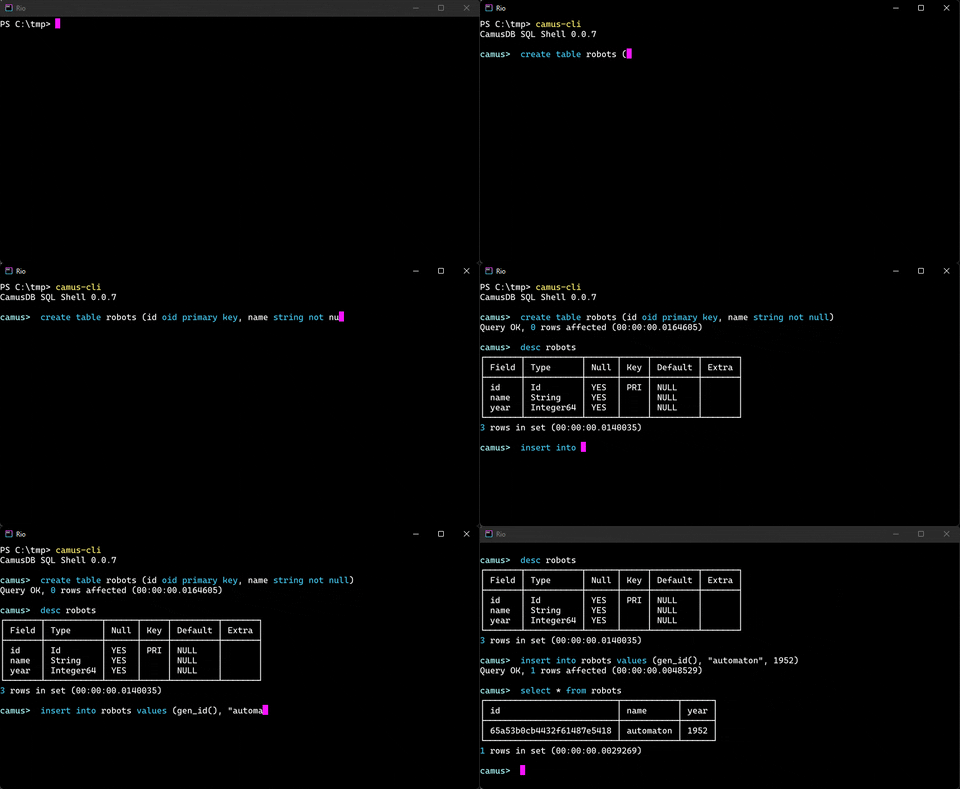
Most databases default to weaker isolation levels and ask you to opt in to correctness. CamusDB inverts that: every transaction is serializable unless you ask for less. Pessimistic two-phase locking with range/predicate locks blocks phantoms, wait-die scheduling avoids deadlocks, and reads run against consistent snapshots. Cross-partition writes are coordinated with two-phase commit on top of Raft consensus, so a committed write is durable and replicated. If a workload genuinely doesn't need serializability, read-committed is available per transaction (SET TRANSACTION) or as a process default, but you have to say so.
Fork a database the way you branch code:
CREATE DATABASE staging BRANCH FROM prod;The branch is created instantly and shares the parent's bytes until it diverges — no row data is copied, only a small amount of schema metadata. Reads on the branch see the parent as of the fork instant, writes are private to the branch, and the parent keeps evolving and never sees the branch. Branches nest arbitrarily deep, and the fork's frozen view is kept durable by a Raft-replicated snapshot-floor hold, so a long-lived branch keeps reading its parent as-of the fork instant even under heavy parent churn. Use it for cheap staging clones of production, schema-migration dry-runs, per-PR ephemeral databases, and "what-if" analytics. See Database Branching below.
DROP DATABASE and DROP TABLE don't immediately destroy data. The object is unlinked (orphaned) and physically deleted only after a retention window, so an accidental drop can be undone while the data still exists:
SHOW ORPHAN TABLES;                     -- list recoverable objects
CREATE TABLE users RELINK TO '<id>';    -- bring one back under a (new) name
A background reclaimer garbage-collects orphans once their retention window elapses.
Read a table as it existed at a point in the past — the storage layer is multi-version, so prior revisions of every key are retained and queryable:
SELECT * FROM leaderboard AS OF SYSTEM TIME '-10s';                        -- 10 seconds ago
SELECT * FROM accounts    AS OF SYSTEM TIME '2026-07-19 20:00:00+00:00';  -- an exact instant
The whole statement, every scanned table, join, and subquery, reads one consistent historical snapshot, lock-free and without blocking writers. Beyond debugging ("what did this row look like before the deploy?"), it's a recovery tool: rows deleted or overwritten by mistake can be read back from just before the bad statement and re-inserted, as long as the storage layer still retains that history. See Time-Travel Reads below.
Opt any read into an in-memory, per-node result cache with an inline hint — no external cache tier, no manual invalidation for same-node writes:
SELECT id, total FROM orders {cache=recent_orders, ttl=30s} WHERE status = 1;The cache is correct before it is fast: a committed write on the same node evicts every dependent entry before it becomes visible to a later read, so a same-node reader never sees stale data. Cross-node staleness is bounded by a per-entry TTL, or eliminated per-hit with strict validation. See Query Result Cache below.
CamusDB's engine is written in modern C# on .NET: the SQL parser, the query planner and operators, the transaction layer, and the embedded Kahuna storage node all run in a single .NET process (with RocksDB underneath for persistence). Because the engine itself is pure .NET, extending it means writing ordinary C#: bring your own NuGet libraries and custom business logic directly into the database layer without crossing a language boundary or fighting a foreign extension API. Reading and debugging the engine is equally direct, and it runs on any platform .NET 10 supports. Clients talk to it over a JSON/HTTP API or a gRPC API with a .NET client library.
- SQL dialect — SELECT (including
FROM-lessSELECT <expr>), INSERT, UPDATE, DELETE, CREATE/DROP/ALTER TABLE, transactions (BEGIN / COMMIT / ROLLBACK), parameterized placeholders, prepared statements, table aliases, derived tables, simple inner joins, comma joins, row-level DISTINCT, and case-insensitive identifier handling. - ACID transactions — pessimistic locking; serializable isolation is the default (range/predicate locks with wait-die deadlock avoidance and snapshot reads), with read-committed available per transaction (
SET TRANSACTIONor the begin-request field) or as a process default; cross-partition writes use two-phase commit (2PC). - Copy-on-write database branching — fork a database instantly with
CREATE DATABASE feature_x BRANCH FROM prod; inspect the tree withSHOW BRANCHES FROM dbandSHOW ANCESTORS FROM db. - Recovering dropped objects — deferred physical deletion with
RELINK TO '<id>'recovery,SHOW ORPHAN DATABASES/SHOW ORPHAN TABLES, and a background reclaimer. - Time-travel reads —
SELECT … AS OF SYSTEM TIME '-10s'(or an absolute UTC timestamp / epoch ms) runs the whole statement against a consistent historical snapshot; lock-free, never blocks writers, usable to read back accidentally deleted or overwritten rows while their history is retained. - Query result cache — opt-in per query via
{cache=…}hints, with TTL,strictper-hit validation, andEVICT CACHEstatements; same-node writes invalidate dependent entries before they become visible. - Aggregation — COUNT, SUM, AVG, MIN, MAX with GROUP BY and HAVING filters.
- Filtering and ordering — WHERE clauses with =, !=, <, >, <=, >=, AND, OR, LIKE, ILIKE, regex match operators (
,*), BETWEEN, IS NULL, IN, NOT IN, scalar subqueries, and EXISTS subqueries; ORDER BY (ASC/DESC), projection aliases, ordinal references, LIMIT, and OFFSET.*, !, ! - Scalar functions — string, math, date/time, cast, object id, regex, and JSON helpers including
json_valid,json_type,json_extract,json_value,json_array_length, andjson_contains. - Query planning — physical plan trees for table scans, index scans, joins, aggregation, distinct, sorting, and limits, with predicate/projection/limit pushdown, index-based sort elision, join-order heuristics, index nested-loop joins for eligible equi-joins, semi/anti-join rewrite of indexed
IN/NOT INsubqueries, index-driven value-listIN, and streamingDISTINCT. A small statistics-backed cost model (row counts, per-index counts, per-column min/max) chooses between index and full scans. - Query introspection —
EXPLAIN,EXPLAIN (LOGICAL),EXPLAIN (PHYSICAL), andEXPLAIN (ANALYZE)return the plan as result rows (node names, details, estimated rows/cost, and — forANALYZE— actual row counts and KV access counters). - Indexes — PRIMARY KEY, inline UNIQUE column constraints, UNIQUE indexes, multi-column indexes, per-column ascending/descending ordered indexes, CREATE INDEX IF NOT EXISTS, CREATE UNIQUE INDEX IF NOT EXISTS, and ALTER TABLE ADD/DROP INDEX.
- Database management — databases must be created explicitly (
CREATE DATABASE,DROP DATABASE [IF EXISTS],RENAME DATABASE old TO new); there is no magic creation. Each database is assigned an immutable internal id at creation time; the name is a display-only label that can be renamed without moving any data. - Schema management — CREATE TABLE IF NOT EXISTS, DROP TABLE IF EXISTS, ALTER TABLE ADD/DROP COLUMN, ALTER TABLE RENAME TABLE/COLUMN/INDEX, column DEFAULT values (including function defaults such as
gen_uuid_v7()), CHECK constraints, andSHOW CREATE TABLE. - Multi-node cluster — Raft consensus (via Kommander) partitions data across nodes; each partition elects its own leader. Nodes join a cluster with
--mode=clusterand a static peer list. - Standalone mode — runs as a single embedded process with no cluster configuration required.
- APIs — all database operations are accessible over a JSON/HTTP endpoint and over a gRPC endpoint (streaming query results and a duplex batch-execute channel with per-transaction chains).
- Multi-platform — runs on any platform supported by .NET 10.
| Type | SQL keyword(s) | Notes |
|---|---|---|
| String | string, string(N), varchar, char, text |
UTF-8 text; string(N) bounds the length |
| Integer64 | int64, int |
64-bit signed integer |
| Float64 | float64 |
64-bit IEEE-754 |
| Float32 | float32, real |
32-bit IEEE-754 |
| Bool | bool, boolean |
|
| Id | object_id, oid |
24-hex ObjectId, the default primary-key type |
| Uuid | uuid, guid |
native 128-bit UUID; gen_uuid_v4() / gen_uuid_v7() |
| Bytes | bytes, blob |
binary; 0x…-hex in SQL, base64 in JSON |
| Date | date |
calendar date |
| DateTime | datetime, timestamp |
date + time |
| Array | array(<elem>) |
homogeneous array of a scalar element type (not nested) |
CREATE TABLE IF NOT EXISTS app_users (
  id STRING PRIMARY KEY NOT NULL,
  email STRING UNIQUE NOT NULL,
  display_name STRING NOT NULL,
  password_hash STRING NOT NULL,
  role STRING NOT NULL,
  created_at_utc STRING NOT NULL
);

CREATE UNIQUE INDEX IF NOT EXISTS app_users_email_idx ON app_users (email);

SELECT DISTINCT role FROM app_users ORDER BY role;

SELECT role, COUNT(*) AS users
FROM app_users
GROUP BY role
HAVING users > 0
ORDER BY 2 DESC;

SELECT r.id, r.name, ur.amount
FROM robots r
JOIN user_robots ur ON r.id = ur.robots_id;

SELECT r.id, r.name, ur.amount
FROM robots r, user_robots ur
WHERE r.id = ur.robots_id;

SELECT *
FROM robots
WHERE id NOT IN (SELECT robots_id FROM user_robots);

SELECT json_value(payload, "$.name")
FROM robots
WHERE json_valid(payload) = true;

EXPLAIN SELECT * FROM app_users WHERE email = 'a@example.com';

EXPLAIN (ANALYZE) SELECT role, COUNT(*) FROM app_users GROUP BY role;
SELECT DISTINCT is row-level distinct. Aggregate-level distinct such as COUNT(DISTINCT code) is not supported yet.
A single node can be started from the published image, mapping the JSON/REST and gRPC ports and persisting data in a named volume:
docker run --rm \
        -p 5095:5095 \
        -p 5096:5096 \
        -v camus-data:/data \
--name camusdb camusdb/camusdb:latestA three-node cluster can be started with Docker Compose:
docker compose -f docker/local.yml up --buildThis starts three nodes on a private bridge network:
| Node | JSON/REST API | gRPC API | Raft port |
|---|---|---|---|
| camus1 | localhost:5095 | localhost:6095 | 7070 |
| camus2 | localhost:5096 | localhost:6096 | 7072 |
| camus3 | localhost:5097 | localhost:6097 | 7074 |
To run a single node without Docker:
# Standalone (default)
dotnet run --project CamusDB

# Cluster node
dotnet run --project CamusDB -- \
  --mode=cluster \
  --raft-nodename=camus-1 \
  --raft-host=192.168.1.10 \
  --raft-port=7070 \
  --initial-cluster-partitions=3 \
--initial-cluster 192.168.1.10:7070 192.168.1.11:7072 192.168.1.12:7074A SQL statement enters over the HTTP API, is parsed into an AST, bound against the catalog, and turned into a physical plan by a cost-based query planner. The plan executes as a tree of storage-agnostic operators (scan, filter, join, aggregate, sort, project, limit) that read and write rows through a transactional key-value layer. That KV layer is an embedded Kahuna node: table rows and index entries are mapped onto Kahuna keys with a prefix layout, transactions are coordinated via Kahuna's transaction API, and durability and replication are provided by Raft (Kommander). In a cluster, data is partitioned across nodes — each partition elects its own leader, statements are routed to the owning partition, and cross-partition writes use two-phase commit. Standalone mode runs the same stack against a per-process embedded node with no cluster configuration.
See docs/architecture.md for a full developer reference: the request lifecycle, each layer (parser, binder, planner, operators, catalog, KV storage, transactions, cluster transport), the key layout and partitioning model, and how standalone and cluster modes differ.
See docs/query-planner.md for a full developer reference: pipeline stages, physical plan nodes, predicate analysis, index scan selection, join execution, the cost model and statistics, optimization passes, file map, and a checklist for adding new SQL features. For the user-facing EXPLAIN output format (node names, columns, and worked examples) see docs/explain.md.
See docs/distributed-schema-architecture.md for a full developer reference on how DDL works across a cluster: schema as a replicated state machine over an ordered Raft log, the schema-change delta and the two-version invariant, ack-based convergence, the staged online-schema state machine (DeleteOnly → WriteOnly → Public) with a convergence gate between steps, the resumable change coordinator and crash-safe index backfill, follower→leader DDL forwarding with idempotent dedup, positional row encoding (why renames are free), schema-version pinning, the checkpoint persist-failure policy, an invariants checklist, and known limitations.
Fork a database the way you branch code. CREATE DATABASE feature_x BRANCH FROM prod mints an instant, copy-on-write point-in-time fork: it shares the parent's bytes until it diverges, so creating a branch copies no row data — only a small amount of schema metadata. Reads on the branch see the parent as of the fork instant, writes are private to the branch, and the parent keeps evolving and never sees the branch.
-- Instantly fork production into an isolated, writable clone (no data copied)
CREATE DATABASE staging BRANCH FROM prod;

-- Inspect the branch tree
SHOW BRANCHES  FROM prod;     -- every database forked (transitively) from prod, with depth
SHOW ANCESTORS FROM staging;  -- staging's fork chain, immediate parent up to the root

-- Throw it away when done — the parent is untouched
DROP DATABASE staging;
Use it for cheap staging clones of production, schema-migration dry-runs, per-PR ephemeral databases, and "what-if" analytics. Branches nest arbitrarily deep, and the fork's frozen view is kept durable by a Raft-replicated snapshot-floor hold — so a long-lived branch keeps reading its parent as of the fork instant even under heavy parent churn.
See docs/database-branching.md for a full developer/operator reference: the ancestry model and read lineage, the copy-on-write overlay and tombstones, frozen-view durability, crash-recovery, and operator guidance (metrics, config knobs, limitations).
DROP DATABASE/DROP TABLE defer physical deletion: the object is unlinked (orphaned) rather than immediately erased, so it can be recovered while its data still exists by relinking under a new name.
DROP TABLE users;                        -- unlinks; data survives for the retention window

SHOW ORPHAN TABLES;                      -- list recoverable tables (with ids and drop time)
SHOW ORPHAN DATABASES;                   -- likewise for databases

CREATE TABLE users RELINK TO '<id>';     -- recover a dropped table under a name
CREATE DATABASE app RELINK TO '<id>';    -- recover a dropped database
A background reclaimer garbage-collects orphans once their retention window elapses; until then, a drop is reversible.
Append AS OF SYSTEM TIME to a SELECT and the whole statement — every scanned table, join, and subquery — reads a single consistent historical snapshot instead of the latest committed data. The storage layer is multi-version: each key retains prior revisions tagged with the HLC timestamp at which they committed, so a historical read simply pins its snapshot to a past instant. Historical reads are lock-free and never block writers.
-- Relative offset into the past (units: ms, s, m, h, d)
SELECT * FROM leaderboard AS OF SYSTEM TIME '-10s';

-- Absolute UTC instant (also accepts epoch milliseconds or a bound parameter)
SELECT * FROM accounts AS OF SYSTEM TIME '2026-07-19 20:00:00+00:00' WHERE id = 9910;
This doubles as a fine-grained recovery tool: after an accidental DELETE or a bad UPDATE, query the table as of just before the mistake and re-insert what was lost. No backup restore needed, as long as the storage layer still retains that history (by default all persisted revisions are kept; tightening revision retention narrows the window).
AS OF SYSTEM TIME is limited to autocommit read-only statements (it is rejected inside explicit transactions, and there is no historical UPDATE/DELETE), and only past instants are accepted. See docs/time-travel-reads.md for the full reference: syntax and accepted value forms, snapshot semantics, restrictions, and retention behavior.
Opt a read into an in-memory, per-node result cache with an inline hint: SELECT * FROM orders {cache=recent_orders}. An identical later query — same shape, same bound values, same schema is served from memory without touching storage. The cache is correct before it is fast: a committed write on the same node evicts every dependent entry before it becomes visible to a later read, so a same-node reader never sees stale data. Writes on other nodes are bounded by a per-entry TTL, or eliminated per-hit with {cache=…, strict}. Options include ttl=30s (units ms/s/m/h) and strict; entries are dropped manually with EVICT CACHE 'name' or EVICT CACHE ALL. The feature is on by default (opt-in per query via the hint — nothing without a {cache=…} hint is cached) and applies to autocommit single-table SELECTs; set query_result_cache_enabled: false to disable it entirely.
-- Cache this result under the "recent_orders" family, expiring after 30 seconds
SELECT id, total FROM orders {cache=recent_orders, ttl=30s} WHERE status = 1;

-- Validate against live storage on every hit (no cross-node staleness window)
SELECT * FROM inventory {cache=stock, strict} WHERE sku = 'ABC-123';

EVICT CACHE 'recent_orders';   -- drop one family for the current database
EVICT CACHE ALL;               -- drop every result-cache entry for the current database
See docs/query-result-cache.md for a full operator/developer reference: the hint syntax and response metadata, the read/publish path, dependency capture and same-node invalidation, the commit-safe publish gate, TTL and strict validation, fingerprinting, the query_result_cache_* config knobs, and known limitations.
CamusDB reads CamusDB/Config/config.yml at startup and merges CLI flags and environment variables into a single resolved configuration (precedence: CLI flag > environment variable > config.yml > built-in default). See docs/configuration.md for the full reference: the precedence model, the CLI ↔ YAML mapping, the isolation/locking and parser-cache tunables, the allow-listed kahuna: engine passthrough, and the validation error matrix.
- .NET 10 SDK
- Docker (optional, for cluster setup)
The test suite is split into two assemblies:
CamusDB.Tests— the fast unit/integration suite (run on every change):dotnet test CamusDB.Tests/CamusDB.Tests.csprojCamusDB.Cluster.Tests— the heavy in-process multi-node cluster suite (real Raft via Kahuna/Kommander). It is isolated in its own assembly so its accumulated in-process load (dozens of sequential clusters) stays out of the fast suite, where it caused load-induced bring-up flakiness. Run it separately / periodically:dotnet test CamusDB.Cluster.Tests/CamusDB.Cluster.Tests.csproj
This project is licensed under the MIT license.
Unless you explicitly state otherwise, any contribution intentionally submitted for inclusion in CamusDB by you, shall be licensed as MIT, without any additional terms or conditions.