
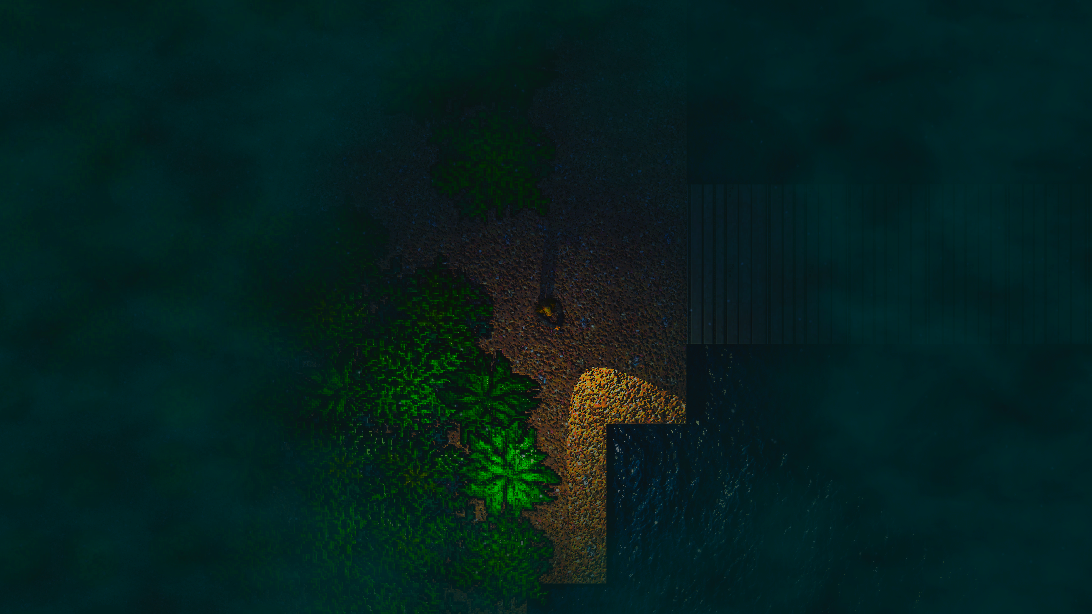
- Top View Game Demo
- Custom Renderer - Wolfenstein 3D
- Card Game Demo
- Displacement Filter
- 2D Lights and Shadows
- Lights, Shadows and Filters
- Journey
- High-performance batch rendering (10.000+ elements at 60fps)
- Dynamic 2D lights and shadows
- Element picker (clickable renderables)
- Image filters (Blur, Pixelate, Distortion, etc.)
- Video textures
- Framebuffer and filter renderers
- Minified and lightweight builds for faster load
- Fully WebGL2 compatible, falls back gracefully if WebGL2 is not supported
PWGL provides multiple builds for different use cases.
Vite production builds:
| File | Format |
|---|---|
dist/pwgl.es.js |
ES Module, minified |
dist/pwgl.umd.js |
UMD, minified |
dist/pwgl.extensions.es.js |
ES Module with extensions, minified |
dist/pwgl.extensions.umd.js |
UMD with extensions, minified |
dist/pwgl.debugger.es.js |
ES Module debugger |
dist/pwgl.debugger.umd.js |
UMD debugger |
PWGL includes an optional debugger bundle for inspecting WebGL calls in the browser. The debugger source is written in TypeScript and is published as JavaScript bundles. Load it before creating WebGL contexts, then initialize it once:
<script src="pwgl.debugger.umd.js" type="text/javascript"></script>
<script>
  PWGLDebugger.init({ maxFrameCount: 5, flags: 0 });
</script>
The debugger wraps webgl and webgl2 contexts returned by canvas.getContext(...),
records calls frame-by-frame, and adds an in-page panel. See
debugger/README.md for flags and recorded data details.
Create your index html ( include pwgl.umd.js and pwgl.extensions.umd.js )
<!DOCTYPE html>
<html>
  <head>
    <script src="pwgl.umd.js" type="text/javascript"></script>
    <script src="pwgl.extensions.umd.js" type="text/javascript"></script>
  </head>
  <body></body>
</html>
Add your script
class Application {
  constructor() {
    // ...
  }
}

// or

const initWebGlApplication = () => {
  // ...
};

PWGL.Utils.initApplication(function (isWebGl2Supported) {
  if (isWebGl2Supported) {
    new Application();
    // or
    initWebGlApplication();
  }
});
Create a simple 2d renderer environment Demo
const initWebGlApplication = () => {
  // render function
  const render = (fps, delay) => {
    // rotate the image
    image.transform.rotation += 0.001 * delay;

    // render the state to framebuffer
    stage2DRenderer.renderToFramebuffer(stage2DRendererFramebuffer);
    // render filters
    filterRenderer.render();
  };

  const width = 800;
  const height = 600;

  // load images and textures
  const texture = PWGL.Texture.loadImage("https://picsum.photos/500/300");

  const stageContainer = document.body;

  // create context
  const context = new PWGL.Context();

  // create framebuffer for the stage 2d renderer
  const stage2DRendererFramebuffer = new PWGL.Framebuffer();

  // create stage 2d renderer
  const stage2DRenderer = new PWGL.Stage2D({
    context,
  });

  // create filter renderer and set the framebuffer as texture source
  const filterRenderer = new PWGL.FilterRenderer({
    context,
    sourceTexture: stage2DRendererFramebuffer,
    filters: [new PWGL.PixelateFilter({ intensity: 5 }), new PWGL.TintFilter({ r: 3, g: 1, b: 0 })],
  });

  stageContainer.appendChild(context.canvas);

  // create renderable element
  const image = new PWGL.Image(texture);
  image.transform.x = width * 0.5;
  image.transform.y = height * 0.5;
  image.transform.width = 400;
  image.transform.height = 240;
  image.transform.anchorX = image.transform.anchorY = 0.5;
  stage2DRenderer.container.addChild(image);

  // resize context and renderers
  context.setCanvasSize(width, height);
  stage2DRenderer.setSize(width, height);
  filterRenderer.setSize(width, height);

  // start render cycle
  PWGLExtensions.utils.enterFrame(render);
};

PWGL.Utils.initApplication((isWebGl2Supported) => isWebGl2Supported && initWebGlApplication());
Filters Demo
const initWebGlApplication = () => {
  // render function
  const render = (fps, delay) => {
    // rotate the image
    image.transform.rotation += 0.001 * delay;

    // render the state to framebuffer
    stage2DRenderer.renderToFramebuffer(stage2DRendererFramebuffer);
    // render filters
    filterRenderer.render();
  };

  const width = 600;
  const height = 375;

  // load images and textures
  const baseTexture = PWGL.Texture.loadImage("https://picsum.photos/500/300");
  const maskTexture = PWGL.Texture.loadImage("https://picsum.photos/500/300");
  const displacementTexture = PWGL.Texture.loadImage("https://picsum.photos/500/300");

  const stageContainer = document.body;

  // create context
  const context = new PWGL.Context();

  // create framebuffer for the stage 2d renderer
  const stage2DRendererFramebuffer = new PWGL.Framebuffer();

  // create stage 2d renderer
  const stage2DRenderer = new PWGL.Stage2D({
    context,
  });
  stage2DRenderer.clearBeforeRender = true;

  // create filter renderer and set the framebuffer as texture source
  const filterRenderer = new PWGL.FilterRenderer({
    context,
    sourceTexture: stage2DRendererFramebuffer,
    filters: [
      new PWGL.ChromaticAberrationFilter({ intensity: 10, isRadial: true }),
      // new PWGL.PosterizeFilter({ intensity: 32 }),
      // new PWGL.BrightnessFilter({ intensity: 1.5 }),
      // new PWGL.ContrastFilter({ intensity: 2 }),
      // new PWGL.HueRotateFilter({ deg: 45 * PWGL.Utils.THETA }),
      // new PWGL.EdgeDetectFilter({ intensity: 3 }),
      // new PWGL.GammaFilter({ intensity: 4 }),
      // new PWGL.GlowFilter({ intensit: 5 }),
      // new PWGL.GrayscaleFilter(),
      // new PWGL.InvertFilter(),
      new PWGL.DisplacementFilter({
        texture: displacementTexture,
        intensity: 30,
      }),
      // new PWGL.MaskFilter({
      //   texture: maskTexture,
      //   type: PWGL.MaskFilter.Type.BLUE,
      // }),
      new PWGL.MaskFilter({
        texture: maskTexture,
        type: PWGL.MaskFilter.Type.RED,
      }),
      // new PWGL.PixelateFilter({ intensity: 4 }),
      new PWGL.BlurFilter({ intensity: 5 }),
      // new PWGL.RainbowFilter(),
      // new PWGL.SaturateFilter({ intensity: 2 }),
      // new PWGL.SepiaFilter(),
      // new PWGL.SharpenFilter({ intensity: 1.2 }),
      // new PWGL.TintFilter({ r: 1, g: 1, b: 0.5 })
    ],
  });
  filterRenderer.clearBeforeRender = true;
  filterRenderer.clearColor.set(0, 0, 0, 0);

  stageContainer.appendChild(context.canvas);

  // create renderable element
  const image = new PWGL.Image(baseTexture);
  image.transform.x = width * 0.5;
  image.transform.y = height * 0.5;
  image.transform.width = 500;
  image.transform.height = 300;
  image.transform.anchorX = image.transform.anchorY = 0.5;
  stage2DRenderer.container.addChild(image);

  // resize context and renderers
  context.setCanvasSize(width, height);
  stage2DRenderer.setSize(width, height);
  filterRenderer.setSize(width, height);

  // start render cycle
  PWGLExtensions.utils.enterFrame(render);
};

PWGL.Utils.initApplication((isWebGl2Supported) => isWebGl2Supported && initWebGlApplication());PWGL is organized into modular components within the src/ directory, each responsible for specific functionality in the 2D WebGL rendering pipeline.
Low-level utilities providing WebGL context management and helper functions.
Manages the WebGL2 rendering context and canvas lifecycle.
- Canvas creation and initialization
- WebGL2 context management with fallback detection
- Texture tracking and resource management
- Context loss/restoration handling
- Canvas size configuration
Wraps WebGL buffer objects for efficient vertex and index data management.
- Vertex buffer object (VBO) handling
- Index buffer management
- Dynamic buffer updates
- Partial structured uploads for active batch data
- Data type conversions
General-purpose utilities and initialization functions.
initApplication()- Detect WebGL2 support and bootstrap the application- Constants and configuration defaults
- Helper functions for color, matrix, and data manipulation
Reusable attributes for display elements.
Enum and constants for blend modes (NORMAL, ADD, MULTIPLY, SCREEN, etc.)
- Determines how pixels are combined when overlapping
- Supports all standard WebGL blend operations
Represents 2D textures loaded from images, canvas, or video elements.
- Automatic texture binding and management
- Supports filtering modes (LINEAR, NEAREST)
- Mipmap generation
- Video texture streaming
Off-screen rendering target for advanced effects.
- Used for filter chains and custom rendering passes
- Supports multiple color attachments
- Enables render-to-texture workflows
Configuration objects for transformations and visual properties
Visual elements and scene graph nodes.
Base class for all renderable objects with transform properties.
- Position (
x,y) - Rotation and scale
- Visibility toggling
- Anchor point for rotation and scaling
- Hierarchical parent-child relationships
Abstract base for renderable elements with rendering-specific properties.
- Rendering type identification
- Blend mode management
- Color tinting
- Matrix cache for performance
Hierarchical node for organizing display objects.
- Add/remove child elements
- Recursive rendering of children
- Transform inheritance
- Bounds calculation
Textured sprite with advanced visual properties.
- Texture mapping with UV coordinates
- Blend modes and tint effects
- Texture transformations (scale, rotation, offset)
- Texture cropping
- Distortion effects
Image with frame-based animation support.
- Sprite sheet animation
- Frame sequencing
- Playback control (play, pause, stop)
- Frame rate configuration
Dynamic 2D light source for realistic lighting.
- Point and directional lighting
- Attenuation and falloff
- Color and intensity
- Shadows calculation
Root container for the scene.
- Defines the visible area
- Coordinate transformation
- Viewport management
Drawable text object for rendering strings in the 2D/WebGL canvas.
- Positioning, alignment, and rotation controls
- Style options (font size, color, weight)
- Text wrapping and baseline handling
Rendering pipeline and frame composition.
Abstract base for all rendering operations.
- WebGL state management
- Matrix operations
- Shader program linking
High-performance batch rendering system for optimal GPU utilization.
- Dynamic batching of geometry
- Reduces draw calls significantly (10,000+ elements at 60fps)
- Automatic batch splitting
- Texture atlas support
Main 2D rendering engine with scene graph management.
- Renders hierarchical display objects
- Viewport management
- Interactive element picking (mouse/touch)
- Event propagation (click, hover, drag)
- Supports stable fps rendering at high element counts
Post-processing effects chain.
- Applies sequential filters to rendered output
- Offscreen rendering to framebuffers
- Multiple filter composition
- Screen-space effects
Specialized renderer for dynamic lighting and shadows.
- Real-time shadow map generation
- Soft shadow rendering
- Multiple light support
- Optimized light frustum culling
Generates normal maps for surface detail and lighting calculations.
- Converts height maps to normal maps
- Real-time generation
- Used for advanced lighting techniques
Generates ambient occlusion maps for realistic shadowing.
- Screen-space ambient occlusion (SSAO)
- Real-time computation
- Enhances visual depth
Post-processing effects and image manipulation filters.
Abstract base for all filter implementations.
- Intensity parameter
- On/off toggling
- Uniform value storage
- BaseKernelFilter - Convolution filters (3x3 kernels)
- BaseSamplingFilter - Sampling-based effects (blur, bokeh)
- BaseTextureFilter - Texture-dependent effects
| Filter | Purpose |
|---|---|
| BlurFilter | Blur with adjustable radius |
| PixelateFilter | Pixelation/mosaic effect |
| EdgeDetectFilter | Edge detection (Sobel operator) |
| SharpenFilter | Image sharpening/unsharp mask |
| GrayscaleFilter | Desaturate to grayscale |
| SepiaFilter | Warm vintage tone |
| InvertFilter | Color inversion |
| SaturateFilter | Increase/decrease saturation |
| BrightnessFilter | Brightness adjustment |
| ContrastFilter | Contrast adjustment |
| HueRotateFilter | Hue rotate |
| GammaFilter | Gamma correction |
| TintFilter | Color overlay tinting |
| PosterizeFilter | Posterization/color reduction |
| RainbowFilter | Chromatic rainbow shift |
| DisplacementFilter | Vertex displacement mapping |
| MaskFilter | Selective region masking |
| ChromaticAberrationFilter | RGB channel separation effect |
| GlowFilter | Bloom/glow effect |
Mathematical types and utilities for geometric calculations.
3x3 matrix operations for 2D transformations.
- Matrix multiplication
- Inverse calculation
- Identity matrix
- Efficient transformation composition
Point/Vector representation with methods.
- 2D coordinates
- Distance calculations
- Vector operations
Rectangle/Bounding box representation.
- Intersection testing
- Containment checking
- Area calculations
The typical rendering flow in PWGL:
- Setup - Create Context, Stage2D, and display objects
- Update - Modify transforms, properties, and states
- Render - Call
stage2DRenderer.render()each frame - Post-Process - Apply filters via FilterRenderer (optional)
- Display - Canvas composites to screen
- Use batch rendering by grouping similar objects
- Reuse textures and framebuffers
- Apply filters selectively only when needed
- Use WebGL2 features for optimization
- Consider frustum culling for large scenes
- Monitor draw calls using browser DevTools
- Modern browsers with WebGL2 support: Chrome, Firefox, Edge, Safari (11+)
- Fallback to WebGL1 with graceful degradation
- Mobile support on iOS Safari and Android Chrome
For additional utilities, input handling, audio, and convenience functions, see the PWGL Extensions documentation.