 |
hyperdrive: an algorithmic trading library |
|---|






hyperdrive is an algorithmic trading library that powers quant research firm  Algotrade.io.
Unlike other backtesting libraries, hyperdrive specializes in data collection and quantitative research.
- Data Collection: Aggregate market data from Polygon, Robinhood, and BLS
- Cloud Storage: Seamless S3 integration for historical data
- Backtesting: Strategy testing with vectorbt
- AI/ML: Machine learning predictions with AutoGluon
- Exchange Support: Trade on Binance, Alpaca, and Kraken
- CI/CD Ready: GitHub Actions workflows for automated data updates
Love this tool? Your support means the world! ❤️
| Currency | Address | QR |
|---|---|---|
| ₿ BTC | bc1qwn7ea6s8wqx66hl5rr2supk4kv7qtcxnlqcqfk |
 |
| Ξ ETH | 0x7cdB1861AC1B4385521a6e16dF198e7bc43fDE5f |
 |
| ɱ XMR | 463fMSWyDrk9DVQ8QCiAir8TQd4h3aRAiDGA8CKKjknGaip7cnHGmS7bQmxSiS2aYtE9tT31Zf7dSbK1wyVARNgA9pkzVxX |
 |
| ◈ BNB | 0x7cdB1861AC1B4385521a6e16dF198e7bc43fDE5f |
 |
pip install hyperdrive -UOr with uv:
uv pip install hyperdriveClone the repository and install in development mode:
git clone https://github.com/suchak1/hyperdrive.git
cd hyperdrive
make install DEV=1 # Install with dev dependenciesMost secrets must be passed as environment variables. Future updates will allow secrets to be passed directly into class objects (see example on order execution).
Pre-requisites:
- a Polygon API key
- an AWS account and an S3 bucket
Environment Variables:
POLYGONAWS_ACCESS_KEY_IDAWS_SECRET_ACCESS_KEYAWS_DEFAULT_REGIONS3_BUCKET
from hyperdrive import DataSource
from DataSource import Polygon, MarketData

# Polygon API token loaded as an environment variable (os.environ['POLYGON'])

symbol = 'TSLA'
timeframe = '7d'

md = MarketData()
poly = Polygon()

poly.save_ohlc(symbol=symbol, timeframe=timeframe)
df = md.get_ohlc(symbol=symbol, timeframe=timeframe)

print(df)
Output:
           Time     Open       High      Low    Close       Vol
2863 2021-11-10  1010.41  1078.1000   987.31  1067.95  42802722
2864 2021-11-11  1102.77  1104.9700  1054.68  1063.51  22396568
2865 2021-11-12  1047.50  1054.5000  1019.20  1033.42  25573148
2866 2021-11-15  1017.63  1031.9800   978.60  1013.39  34775649
2867 2021-11-16  1003.31  1057.1999  1002.18  1054.73  26542359
Much of this code is still closed-source, but you can take a look at the Historian class in the History module for some ideas.
We use vectorbt to backtest strategies.
from hyperdrive import History, DataSource, Constants as C
from History import Historian
from DataSource import MarketData

hist = Historian()
md = MarketData()

symbol = 'TSLA'
timeframe = '1y'

df = md.get_ohlc(symbol=symbol, timeframe=timeframe)

holding = hist.from_holding(df[C.CLOSE])
signals = hist.get_optimal_signals(df[C.CLOSE])
my_strat = hist.from_signals(df[C.CLOSE], signals)

metrics = [
    'Total Return [%]', 'Benchmark Return [%]',
    'Max Drawdown [%]', 'Max Drawdown Duration',
    'Total Trades', 'Win Rate [%]', 'Avg Winning Trade [%]',
    'Avg Losing Trade [%]', 'Profit Factor',
    'Expectancy', 'Sharpe Ratio', 'Calmar Ratio',
    'Omega Ratio', 'Sortino Ratio'
]

holding_stats = holding.stats()[metrics]
my_strat_stats = my_strat.stats()[metrics]

print(f'Buy and Hold Strat\n{"-"*42}')
print(holding_stats)

print(f'My Strategy\n{"-"*42}')
print(my_strat_stats)

# holding.plot()
my_strat.plot()
Output:
Buy and Hold Strat
------------------------------------------
Total Return [%]                138.837436
Benchmark Return [%]            138.837436
Max Drawdown [%]                 36.246589
Max Drawdown Duration    186 days 00:00:00
Total Trades                             1
Win Rate [%]                           NaN
Avg Winning Trade [%]                  NaN
Avg Losing Trade [%]                   NaN
Profit Factor                          NaN
Expectancy                             NaN
Sharpe Ratio                      2.206485
Calmar Ratio                      6.977133
Omega Ratio                       1.381816
Sortino Ratio                     3.623509
Name: Close, dtype: object

My Strategy
------------------------------------------
Total Return [%]                364.275727
Benchmark Return [%]            138.837436
Max Drawdown [%]                  35.49422
Max Drawdown Duration    122 days 00:00:00
Total Trades                             6
Win Rate [%]                          80.0
Avg Winning Trade [%]            52.235227
Avg Losing Trade [%]             -3.933059
Profit Factor                     45.00258
Expectancy                      692.157004
Sharpe Ratio                      4.078172
Calmar Ratio                     23.220732
Omega Ratio                       2.098986
Sortino Ratio                     7.727806
Name: Close, dtype: object
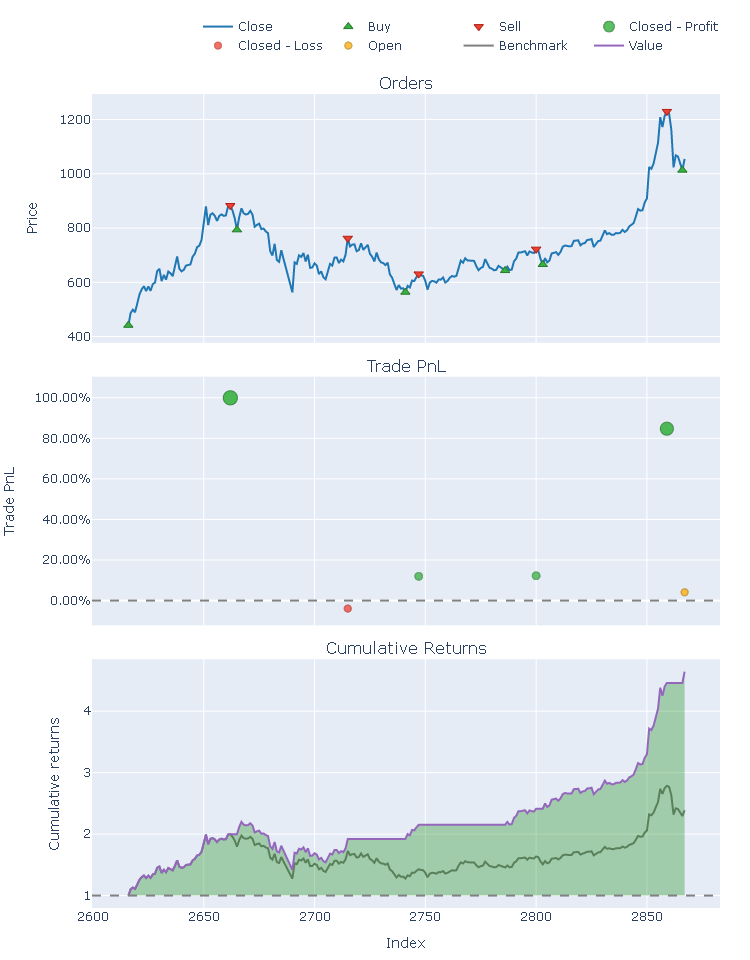
Pre-requisites:
- a Binance.US API key
Environment Variables:
BINANCE
from pprint import pprint
from hyperdrive import Exchange
from Exchange import Binance

# Binance API token loaded as an environment variable (os.environ['BINANCE'])

bn = Binance()

# use 45% of your USD account balance to buy BTC
order = bn.order('BTC', 'USD', 'BUY', 0.45)

pprint(order)
Output:
{'clientOrderId': '3cfyrJOSXqq6Zl1RJdeRRC',
 'cummulativeQuoteQty': 46.8315,
 'executedQty': 0.000757,
 'fills': [{'commission': '0.0500',
            'commissionAsset': 'USD',
            'price': '61864.6400',
            'qty': '0.00075700',
            'tradeId': 25803914}],
 'orderId': 714855908,
 'orderListId': -1,
 'origQty': 0.000757,
 'price': 0.0,
 'side': 'SELL',
 'status': 'FILLED',
 'symbol': 'BTCUSD',
 'timeInForce': 'GTC',
 'transactTime': 1637030680121,
 'type': 'MARKET'}
hyperdrive/
├── hyperdrive/              # Core package
│   ├── DataSource.py       # Market data providers (Polygon, Robinhood)
│   ├── Exchange.py         # Trading integrations (Binance, Alpaca, Kraken)
│   ├── History.py          # Backtesting with vectorbt
│   ├── Precognition.py     # ML predictions with AutoGluon
│   ├── Storage.py          # S3 cloud storage
│   ├── Broker.py           # Order execution
│   ├── Constants.py        # Shared constants
│   └── _version.py         # Package version
├── scripts/                 # Automation & data update scripts
├── tests/                   # Unit and integration tests
├── .github/workflows/       # CI/CD pipelines
│   ├── pr.yml              # PR checks + TestPyPI
│   ├── release.yml         # Release + PyPI
│   ├── test.yml            # Reusable test workflow
│   └── *.yml               # Data collection jobs
└── pyproject.toml          # Project configuration
flowchart LR
    subgraph Data["📊 Data Sources"]
        Polygon[Polygon API]
        RH[Robinhood]
        BLS[BLS API]
    end

    subgraph Core["🔧 hyperdrive"]
        DS[DataSource]
        S3[(S3 Storage)]
        Hist[History]
        ML[Precognition]
    end

    subgraph Trade["💹 Exchanges"]
        Binance[Binance]
        Alpaca[Alpaca]
        Kraken[Kraken]
    end

    subgraph CI["⚙️ GitHub Actions"]
        Scheduled[Scheduled Jobs]
        PR[pr.yml]
        Release[release.yml]
    end

    Polygon --> DS
    RH --> DS
    BLS --> DS
    DS --> S3
    S3 --> Hist
    Hist --> ML
    ML --> Binance
    ML --> Alpaca
    ML --> Kraken
    Scheduled --> DS
    PR --> |TestPyPI| S3
    Release --> |PyPI| S3
Run the test suite:
make testRun with coverage reporting:
make covRun smoke tests:
make smokeUse the scripts provided in the scripts/ directory as a reference since they are actually used in production daily.
Available data collection workflows:
 (from Robinhood)
 (from Polygon)
 (from Polygon)
 (from Polygon)
 (from Polygon)
 (from Bureau of Labor Statistics)
MIT License — see LICENSE for details.