This repository contains the Docker Compose configurations to deploy the CIRPASS 2 test environment.
© CIRPASS-2 Consortium, 2024-2027

The CIRPASS-2 project receives funding under the European Union's DIGITAL EUROPE PROGRAMME under the GA No 101158775.
Important disclaimer: All software and artifacts produced by the CIRPASS-2 consortium are designed for exploration and are provided for information purposes only. They should not be interpreted as being either complete, exhaustive, or normative. The CIRPASS-2 consortium partners are not liable for any damage that could result from making use of this information. Technical interpretations of the European Digital Product Passport system expressed in these artifacts are those of the author(s) only and do not necessarily reflect those of the European Union, European Commission, or the European Health and Digital Executive Agency (HADEA). Neither the European Union, the European Commission nor the granting authority can be held responsible for them. Technical interpretations of the European Digital Product Passport system expressed in these artifacts are those of the author(s) only and should not be interpreted as reflecting those of CEN-CENELEC JTC 24.
The below diagram shows how the tools works together.
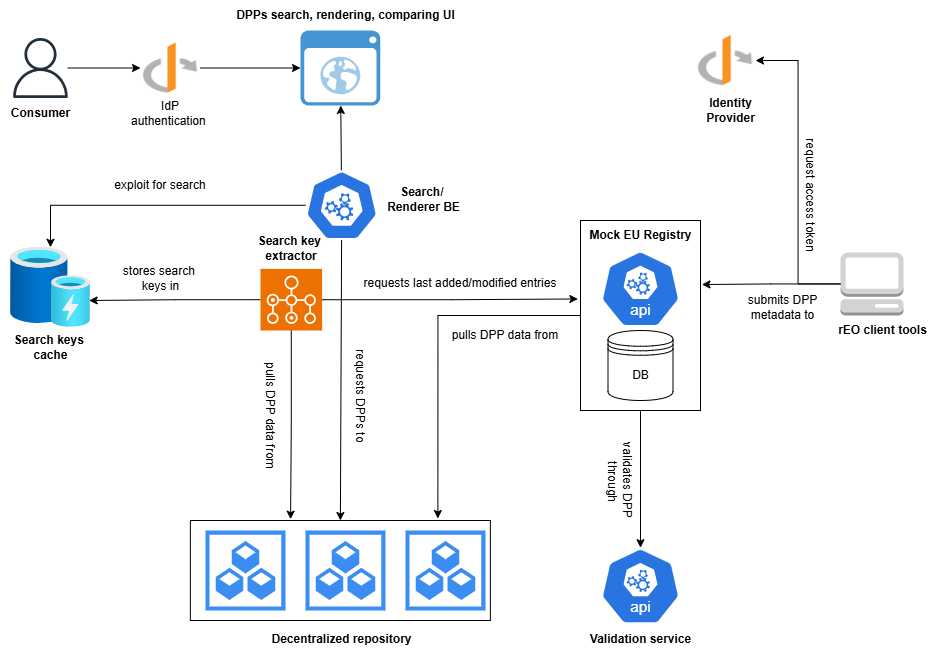
The diagram above shows how the CIRPASS 2 services work together. Two actors interact with the system: the Economic Operator (rEO), who submits Digital Product Passports; and the Web User, who browses and compares DPPs through the frontend. These actors are costituted by four backend services — mock-eu-registry, dpp-validator,dpp-data-extractor, and renderer-be — all backed by PostgreSQL and secured via Keycloak.
Three main flows are supported:
-
The rEO flow (handled by
mock-eu-registryanddpp-validator) implies:- A REST client retrieving a token from Keycloak.
- A REST client submitting DPP metadata to
mock-eu-registryusing the retrieved token for authentication. The metadata includes a live URL — a publicly reachable endpoint where the actual DPP payload can be fetched. mock-eu-registryfetching the actual DPP payload from the live URL and forwarding it todpp-validatorfor validation before persisting the metadata.mock-eu-registryreturning the registry ID to the client on success, or rejecting the submission if validation fails.
-
The extraction flow (handled by
dpp-data-extractor) implies:dpp-data-extractorpollingmock-eu-registryfor recently created or modified entries with model-level granularity.dpp-data-extractorfetching the actual DPP payload from the live URL of each entry.dpp-data-extractorextracting structured data from each payload and persisting it in the search keys cache — a dedicated PostgreSQL database used byrenderer-beto serve search queries.
-
The Web UI user flow (handled by
renderer-feandrenderer-be) implies:- A user authenticating via Keycloak and accessing
renderer-fe. - The user searching model-level DPP data from the search keys cache via
renderer-be. - The user rendering individual DPPs by scanning a QR code or entering a URL directly, retrieving them via
renderer-be. - The user comparing multiple DPPs by repeatedly scanning QR codes or adding DPP URLs and issuing a comparison request to the
renderer-be.
- A user authenticating via Keycloak and accessing
The test environment uses:
- Keycloak as an OpenID compliant IdP.
- PostgreSQL as the DB for the mock-eu-registry, the dpp-validator and as the search keys cache.
deploy-resources/
├── keycloak/
│   ├── docker-compose.yaml        # Keycloak service + dedicated DB
│   └── realm/
│       └── cirpass-2-realm.json   # Pre-configured Keycloak realm
├── postgres/
│   ├── docker-compose.yaml        # PostgreSQL DB for the applications
│   └── scripts/                   # Automatic DB init scripts
├── test_environment/
│   ├── docker-compose.yaml        # Main entry point for the test environment
│   └── .env                       # Environment variables for the test environment
From the repository root, run:
docker compose -p dpp_live_test_environment -f ./test_environment/docker-compose.yaml up --pull always -dThe --pull always flag ensures the latest images are always pulled before startup.
The docker-compose.yaml in test_environment orchestrates the entire CIRPASS 2 stack, pulling in the keycloak/ and postgres/ compose files via the include directive.
| Service | Exposed port | Description |
|---|---|---|
| Keycloak | 8180 |
Identity & Access Management (IAM) |
| keycloak-postgres | 5433 |
PostgreSQL database dedicated to Keycloak |
| postgres | 5434 |
PostgreSQL database for the applications (registry, validator, portal) |
| mock-eu-registry | 8082 |
Mock EU registry for DPP management |
| dpp-validator | 8083 |
Digital Product Passport validation service |
| dpp-data-extractor | 8084 |
Data extraction tool from model-level DPPs for populating the search database |
| renderer-be | 8085 |
Backend for the DPP search and comparison frontend |
| renderer-fe | 4200 |
Frontend for DPP search and comparison |
The application databases (registry, validator, portal) are created automatically when the PostgreSQL container starts, via the init scripts in postgres/scripts/. No manual operation is required.
The databases are accessible with the default credentials:
- Host:
localhost:5434 - User:
postgres - Password:
postgres
Keycloak is available at http://localhost:8180 and is pre-configured with the cirpass-2 realm.
- User:
admin - Password:
admin
| Client ID | Type | Usage |
|---|---|---|
public-authority |
Confidential | Privileged operations: CRUD on validation resources (validator), CRUD on metadata registry schemas, CRUD on extractor configurations |
EO-identifier |
Confidential | Can be used by Economic Operators to submit DPPs to the registry |
registry-be |
Confidential | Internal client for the mock EU registry |
validator-be |
Confidential | Internal client for the DPP validator |
renderer-be |
Confidential | Internal client for the renderer backend and data extractor |
web-portal-fe |
Public | OIDC client for the frontend |
Additional users or clients can be registered by accessing the Keycloak administration console:
http://localhost:8180
Navigate to Realm: cirpass-2 → Users or Clients to add new entities.
The frontend is available at http://localhost:4200.
Use the default credentials to log in:
- User:
admin - Password:
admin
Alternatively, dedicated users can be registered in the cirpass-2 realm via the Keycloak console and their credentials used to log in.
Validation is disabled by default.
The variable REGISTRY_VALIDATION_ENABLED=false in test_environment/.env disables automatic DPP validation at submit time. To enable it, set:
REGISTRY_VALIDATION_ENABLED=trueWhen enabled, the registry will forward DPPs to the dpp-validator service for validation before accepting them.
The dpp-validator service is not initialised with any JSON Schema or SHACL template. It is the deployer's responsibility to upload the appropriate validation schemas for their DPP models via the validator API (authenticating with the public-authority client).
Two formats are supported:
- JSON Schema
- SHACL (RDF templates)
Pay attention to URLs in DPP metadata or when triggering a UI render that point to locally running applications.
Docker containers cannot resolve localhost as the host machine. If DPP metadata contains URLs pointing to locally exposed applications (e.g. a local DPP server instance), host.docker.internal must be used instead of localhost.
Correct example:
http://host.docker.internal:9090/dpp/solarPanel
Incorrect example (not resolvable from inside containers):
http://localhost:9090/dpp/solarPanel
This applies to any URL included in metadata or payloads submitted to the registry, as well as URLs entered directly in the UI for rendering, that reference services listening on the host machine.